
Updates to the SFO Museum text and image "embossers" (and a brand new tool for color matching)
This blog post was prompted by bug fixes to the sfomuseum/go-image-emboss and sfomuseum/go-text-emboss packages. These package implement libraries and command-line tools for communicating with the sfomuseum/swift-image-emboss-grpc and sfomuseum/swift-text-emboss-grpc gRPC servers which SFO Museum uses to expose the Apple Vision Framework libraries for doing image segmentation and text extraction from images, respectively.
I’ve written about these before in the Extracting Subjects from Images in Swift (and gRPC) and Searching Text in Images on the Aviation Collection Website blog posts. Recently, we have been revisiting the image segmentation tools as a way to improve our workflow for determining the dominant colors in collection objects. The aforementioned bugs in the sfomuseum/go-* package were triggered by some very strict naming convention requirements in the protocol definitions used for gRPC communications which prevented both (Go) packages from being imported at the same time. Doh!
At first I thought this would be a straightforward fix updating the names in both the Go and Swift packages, publishing minor releases for everything and getting on with other things. That is when I discovered that the grpc/grpc-swift packages, which underpin all the SFO Museum gRPC Swift packages, had undergone a major, backwards-incompatible update. Everything got more involved than I expected or wanted and, to be honest, has raised some doubts about the use of gRPC services in general.
Fast-forward and the SFO Museum Swift (server) packages have now all been updated to use the newer grpc/grpc-swift packages and the SFO Museum Go (client) packages have been updated accordingly. Although there are backwards-incompatible changes in how the Go packages are used as library-code the command line tools they expose still work exactly the same as before.
In addition to all these changes the go-image-emboss package now includes a new command line tool, called review-colors, to perform image segmentation, color extraction and “snap-to-grid” matching with one or more color palettes for images, displaying all the results in a handy webpage.
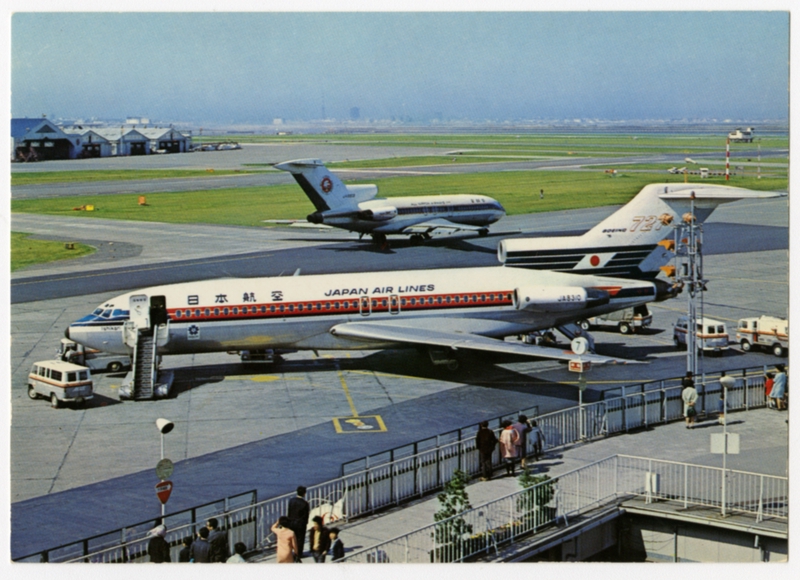
The tool will fetch the image, hand it off to the image-emboss-grpc-server to derive image segments and then extract the dominant colors for both the orginal image and each of the segments aligning each color with its closest match using one or more color palettes. For example, to generate a report for this image of a Japan Arilines 727 at Haneda airport you would invoke the review-colors tool like this:
$> ./bin/review-colors \
	https://static.sfomuseum.org/media/176/271/272/3/1762712723_kriv1bFklzPUdgp3ZapyBmKyPgwfFL0x_z.jpg
And then when you open your browser to http://localhost:49787 (or whatever URL the review-colors tool chooses for you) you’ll see something like this:

Debates about the merits of Apple’s Vision Framework image segmentation choices in this example will be saved for another day. Likewise the question of whether or not an image’s overall color palette should be determined solely on what is considered to be the “primary” subject. Think of it as a cautionary tale about the wholesale forfeiting of nuance that we, collectively in 2025, are flirting with in the service of probability-driven automation…
You can specify one or more paths for local or remote images in the same command but, for the time being, this is all the review-colors tool does. I’ve considered making it in to a fancy interactive web application but that has not happened yet. The actual code for deriving colors is provided by the aaronland/go-colours package which exposes its functionality as library methods and a series of command-line tools.
For example, here is the output of the extrude tool (used to extract (or “extrude”) dominant colors, and their closest match in a named color-palette) for a postcard of a DC-7B aircraft:
$> ./bin/extrude  https://static.sfomuseum.org/media/176/270/453/3/1762704533_jnxsOwjYqsa8RyGsJrYFJvAjnQMe1Nqv_z.jpg | jq
[
  {
    "uri": "1762704533_jnxsOwjYqsa8RyGsJrYFJvAjnQMe1Nqv_z.png",
    "extrusions": [
      {
        "extruder": "marekm4",
        "palettes": [
          "crayola",
          "css3",
          "css4"
        ],
        "swatches": [
          {
            "colour": {
              "name": "marekm4",
              "hex": "#b6baa1",
              "reference": "b6baa1"
            },
            "closest": [
              {
                "palette": "crayola",
                "colour": {
                  "name": "Cadet Blue",
                  "hex": "#b0b7c6",
                  "reference": "crayola"
                }
              },
	      ... and so on
The extrude tool, and the underlying library methods it calls, are what you would use if you want to integrate extracting colors and palette matches programatically. The review-colors tool is for seeing how the different color extraction and palette-matching techniques work. It is just enough code wrapped around the go-image-emboss and go-colours packages to provide some human introspection in to what all the robot-eyes are doing (and seeing) under the hood.