Shared vector embeddings updates: Improved tooling and Cleveland Museum of Art embeddings

Here’s a quick overview of what this blog post covers:
- The go-embeddingsdb vector embeddings database server has been updated to support embeddings with varying dimensions.
- The go-embeddings-harvest package has been refactored into a single unified
embeddings-harvesttool with support for multiple sources, including the recent addition of the Cleveland Museum of Art. - We have published vector embeddings for the objects described in the Cleveland Museum of Art’s open data release.
There is also a “putting it all together” example workflow demonstrating how to create (shared) vector embeddings from scratch and then indexing them in an embeddingsdb database.
Changes to go-embeddingsdb
Vector embeddings come in a variety of sizes, measured by the number of dimensions (floating point numbers) they contain. Embeddings produced by Apple’s MobileClip model have 512 dimensions, embeddings produced by Google’s SigLIP2 models have 1,152 dimensions and so on. Embeddings with different dimensionalities can’t be stored in the same database or database “table”. This has always been one of the limitations of sfomuseum/go-embeddingsdb tools; under the hood there was only a single database with a fixed dimensionality set when that database was created.
The most recent release of the embeddingsdb tools address this by adding the concept of a “multi” (as in “multiple”) database. It is now possible to start an embeddingsdb server specifying per-dimension database implementations. For example to start a server reading and writing 1,152 and 512 dimensions, from an S3Vectors bucket and a SQLite database respectively, you would do this:
$> bin/embeddingsdb-server \
	-server-uri 'grpc://localhost:8081?database-uri={database}' \
	-database-uri 's3vectors://embeddings?region=us-east-1&credentials=session&dimensions=1152&index=embeddings-1152' \
	-database-uri 'sqlite://?dsn=/usr/local/sfomuseum/go-embeddingsdb/work/debug-512.db&dimensions=512' \
	-verbose

2026/10/02 15:22:53 DEBUG Verbose logging enabled
2026/10/02 15:22:53 DEBUG Set up database
2026/10/02 15:22:53 DEBUG Check whether table exists table=s3vectors
2026/10/02 15:22:54 DEBUG Table exists, refresh disabled table=s3vectors
2026/10/02 15:22:54 DEBUG Check whether table exists table=s3vectors_metadata
2026/10/02 15:22:54 DEBUG Table exists, refresh disabled table=s3vectors_metadata
2026/10/02 15:22:54 DEBUG Reassign dimensions value=512
2026/10/02 15:22:54 DEBUG Reassign dimensions value=512
2026/10/02 15:22:54 DEBUG Add database index=0 dimensions=1152 "pagination type"=cursor
2026/10/02 15:22:54 DEBUG Add database index=1 dimensions=512 "pagination type"=countable
2026/10/02 15:22:54 DEBUG Set up listener
2026/10/02 15:22:54 DEBUG Set up server
2026/10/02 15:22:54 DEBUG Allow insecure connections
2026/10/02 15:22:54 INFO Server listening address=localhost:8081
Importantly, none of the interfaces that libraries or clients use to access embeddings need to be updated to reflect these changes. The “multi” database code takes care to route queries to the appropriate database based on the dimensionality (model) of the request at hand. “List records” queries, like those used by the embeddingsdb-inspector web application, are handled by iterating through the results returned by each registered database taking care to hide all the pagination details, while still enabling backwards and forwards pagination.
This is a small change but one that should make it possible to enable additional and improved features for comparing how different models interact with the same data (images). As mentioned, the current implementation only allows one database type per dimensionality (vector size). This limitation will be addressed in future releases with the aim of enabling equivalent tools for evaluating the output of the different underlying databases working with the same embeddings.
Changes to go-embeddings-harvest
All (most) of the code we use to generate vector embeddings is contained in tools which are part of the sfomuseum/go-embeddings-harvest package. These tools produce Parquet files which can be imported into an embeddingsdb instance or simply shared publicly with others. For example:
+------------------------+      +-----------------------+      +---------------------+
| Raw Museum Open Data   | ---> | go-embeddings-harvest | ---> | Shared Parquet File |
| (CMA, MoMA, NGA, etc.) |      +-----------------------+      +---------------------+
+------------------------+                  |                             |
                                            v                             v
                                  +-------------------+         +--------------------+
                                  | Local Blob Cache  |         | go-embeddingsdb    |
                                  |     (Images)      |         | Database Server    |
                                  +-------------------+         +--------------------+
When this package was first released it contained a number of unique per-data-source tools for producing (harvest) vector embedding Parquet files. Those tools have now been refactored into a single harvest-embeddings tool. These changes consolidate common code and define a simple interface to be implemented by the different data sources. It should, hopefully, also make it easier and faster to add new data sources going forward.
To test these changes a new “harvester” was added: One to produce vector embedding Parquet files derived from data published in the Cleveland Museum of Art (CMA) open data release. For example, this is how you would produce embeddings for the CMA data using the Google https://huggingface.co/google/siglip2-base-patch16-naflex model saving that data to a Parquet file called cma-naflex.parquet:
$> ./bin/harvest-embeddings \
	-harvester-uri cma:///usr/local/data/cma/openaccess/data.csv \
	-embeddings-client-uri 'siglip-client://?client-uri=http://localhost:5000' \
	-cache-uri file:///usr/local/data/blobcache/ \
	-output work/cma-naflex.parquet
In addition to the Cleveland Museum of Art, the harvest-embeddings tool also supports creating vector embedding Parquet files for data published by SFO Museum, the National Gallery of Art, the Museum of Modern Art and the Smithsonian.
Publishing Cleveland Museum of Art vector embeddings
We have created vector embeddings for the Cleveland Museum of Art open data release using Apple’s MobileClip and Google’s siglip2-so400m-patch16-naflex and siglip2-so400m-patch14-384 models and published them to SFO Museum’s “shared vector embeddings” website:
The SigLIP2 models may or may not have been uploaded by the time you read this. This is a reflection of the fact that they take a while to produce (see below) and the fact that I introduced some race conditions (now fixed) into the refactored embeddings-harvest code which has meant rebuilding the embeddings a few times over now.
Ideally, these are datasets that individual institutions would produce and publish themselves. This is something we are hoping that our work will encourage others to do but we are happy to create these datasets in the interim. This is, and has always been, the promise of open data.
Putting it all together
The following is meant to be an illustrative example of how to generate multiple embeddings (MobileCLIP and SigLIP2) for a data source (the Cleveland Museum of Art). Some of the details, like specific paths, may need to be adjusted. These examples assume a MacOS environment, a familiarity with command line tools. There is a lot of very important work to do to hide some (most) of these details behind easier and friendlier interfaces. That work hasn’t happened yet, and this is what is actually going on “under the hood”. These are all tools, and data, that can run on a laptop from five years ago.
These examples will reference tools provided by the following software packages:
- sfomuseum/swift-mobileclip
- sfomuseum/go-embeddings-harvest
- sfomuseum/go-embeddingsdb
- apple/container
And the following open-weight models, available to download from HuggingFace:
MobileClip
First start the embeddings-grpcd server which is part of the sfomuseum/swift-mobileclip package:
$> cd /usr/local/src/swift-mobileclip
$> embeddings-grpcd serve --models=/usr/local/data/mobileclip --verbose=true
Where /usr/local/data/mobileclip is a folder containing the apple/coreml-mobileclip models.
In another terminal, create some work folders and download the Cleveland Museum of Art open data release. Then run the harvest-embeddings tool which is part of the sfomuseum/go-embeddings-harvest package:
$> mkdir -p /usr/local/data
$> mkdir -p /usr/local/data/blobcache
$> mkdir -p /usr/local/data/embeddings
$> mkdir -p /usr/local/data/embeddingsdb

$> cd /usr/local/data
$> git clone https://github.com/ClevelandMuseumArt/openaccess.git

$> cd /usr/local/src/go-embeddings-harvest
$> ./bin/harvest-embeddings \
	-harvester-uri cma:///usr/local/data/cma/openaccess/data.csv \
	-embeddings-client-uri 'mobileclip://' \
	-cache-uri file:///usr/local/data/blobcache/ \
	-model s0,s1,s2 \
	-output /usr/local/data/embeddingsdb/cma-openaccess-512-mobileclip.parquet
Once this is complete (it will take a little while) you can shut down the embeddings-grpcd server.
SigLIP2
These examples assume a containerized environment that exposes an HTTP endpoint for creating embeddings using Google’s SigLIP2 models. A containerized environment is not strictly necessary but hides many of the details required to install libraries, dependencies and models. These examples also assume virtual machines controlled using Apple’s container tool and containers defined in the sfomuseum/container-siglip package. These containers can also be built and run using Docker, if you prefer.
The first step is to install the container tool which can be done using a package installer signed by Apple. Once installed, start the container service:
$> container system start
Next, if necessary, create a new virtual machine containing the code and the model required to create embeddings. In this example, we are creating embeddings using the siglip2-so400m-patch16-naflex model.
$> cd /usr/local/src/container-siglip
$> make container MODEL=google/siglip2-so400m-patch16-naflex TAG=siglip-server-so400m-patch14-384 HF_TOKEN=s33kret
container build --build-arg MODEL_NAME=google/siglip2-so400m-patch16-naflex --tag siglip-server-so400m-patch16-naflex --file Dockerfile .

...time passes

=> exporting manifest list sha256:4d9f6c5aab770f8f49739440b54806d02982346b5bbd413ea0574a87fc4ab469
0.0s
=> sending tarball
58.1s

siglip-server-so400m-patch16-naflex:latest
Note the HF_TOKEN Makefile variable in the example above. Depending on the model you are trying to download you might need to create a HuggingFace account and configure a programmatic access token to do so. This can be a chore but at least HuggingFace publishes good, easy to follow, documentation.
Now, start the virtual machine exposing port 5000 to the local (host) environment:
$> cd /usr/local/src/container-siglip
$> container run --rm --memory 5G -p 127.0.0.1:5000:5000/tcp siglip-server-so400m-patch16-naflex

INFO:     Started server process [1]
INFO:     Waiting for application startup.
Loading weights: 100%|██████████| 888/888 [00:14<00:00, 60.45it/s]
INFO:main:Model loaded
INFO:     Application startup complete.
INFO:     Uvicorn running on http://0.0.0.0:5000 (Press CTRL+C to quit)
In another terminal, run the harvest-embeddings tool again like this:
$> ./bin/harvest-embeddings \
	-harvester-uri cma:///usr/local/data/cma/openaccess/data.csv \
	-embeddings-client-uri 'siglip-client://' \
	-cache-uri file:///usr/local/data/blobcache/ \
	-output /usr/local/data/embeddings/cma-openaccess-1152-siglip2-naflex.parquet
This will probably take a long time and be dependent on the resources (RAM and CPU) available to your environment. Generating SigLIP2 embeddings is already a compute-intensive process made that much slower by running it through a containerized virtual environment. There are plenty of ways to make things faster but almost always at the expense of making them harder and more complicated (and often more expensive). These examples may require a little more typing and copying-and-pasting than anyone wants but, critically, they can run locally on nothing fancier than a mid-range consumer laptop.
Once complete you can stop the containerized virtual machine and the container service itself (by running container system stop).
Indexing the data in a go-embeddingsdb instance
First start an instance of the embeddingsdb-server which is part of the sfomuseum/go-embeddingsdb package:
$> cd /usr/local/src/go-embeddingsdb
$> bin/embeddingsdb-server \
	-server-uri 'grpc://localhost:8081?database-uri={database}' \
	-database-uri 'sqlite://?dsn=/usr/local/data/embeddingsdb/embeddings-1152.db&dimensions=1152' \
	-database-uri 'sqlite://?dsn=/usr/local/data/embeddingsdb/embeddings-512.db&dimensions=512' \
	-verbose
In another terminal, run the parquet-import tool (also part of the sfomuseum/go-embeddingsdb package) to add the records contained in the two Parquet files to the embeddingsdb database:
$> cd /usr/local/src/go-embeddingsdb
$> bin/parquet-import \
	-client-uri 'grpc://localhost:8081' \
	-verbose \
	/usr/local/data/embeddings/cma-openaccess-512-mobileclip.parquet \
	/usr/local/data/embeddings/cma-openaccess-1152-siglip2-naflex.parquet
Once the indexing is complete, start an instance of the embeddingsdb-inspector web application to review the embeddings:
$> cd /usr/local/src/go-embeddingsdb
$> bin/embeddingsdb-inspector \
	-client-uri 'grpc://localhost:8081' \
	-server-uri 'http://localhost:8080' \
	-verbose \
And then when you open your web browser to http://localhost:8080 you’ll see something like this:
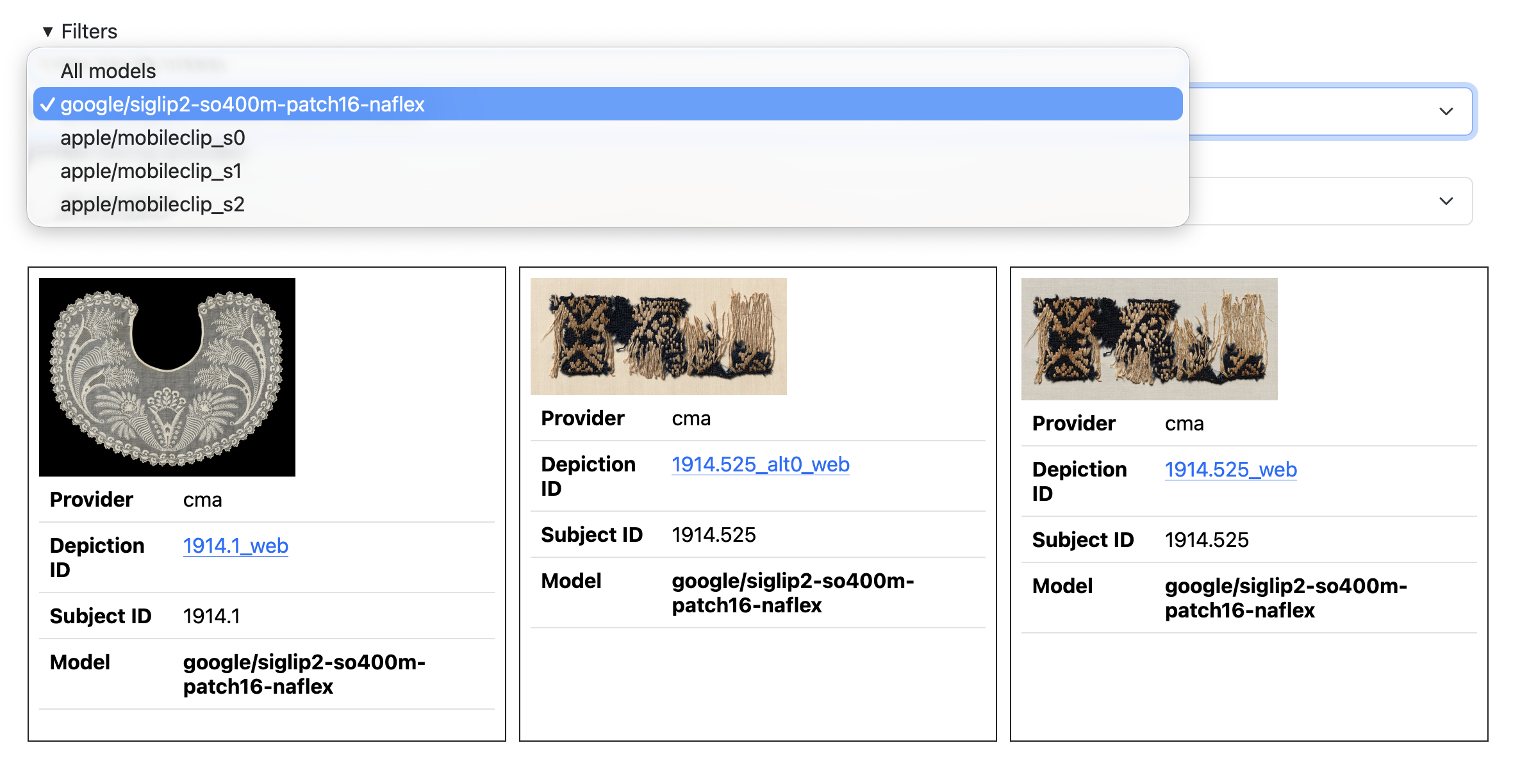
It’s a lot. It’s more than it should be but it’s also a pretty accurate reflection of how many moving pieces are involved generating, indexing and using vector embeddings. It’s probably more information than a lot of people want to have to think about but it also feels important and necessary; to be able to uncouple all of the moving pieces in order to understand how to put them back together again with agency and confidence.