
Shared cross-institutional vector embeddings – how we might get there

This is a blog post about how we might establish the conventions necessary for two or more cultural heritage institutions to share vector embedding data from their respective collections or holdings in order to both perform cross-institutional similarity queries. We are proposing a simple‑is‑best approach to sharing vector embeddings of our collections and tools which might be used to help guide our understanding of the different models used to produce those embeddings.
To investigate this question, and to demonstrate how that sharing might work we have added a new tool to the sfomuseum/go-embeddingsdb package. It is called embeddingsdb-inspector and it is a minimalist web-interface for inspecting documents stored in an embeddingsdb-server instance. The application can show you a list of all the records in an embeddingsdb-server instance and pages for individual records alongside the list of the most “similar” records. Both views can be filtered by the record provider or the model used to create the vector embeddings (for a record). If configured accordingly, it will also allow you to upload a custom image, generate vector embeddings for that image on the fly and then find other images (in the database) with “similar” embeddings.
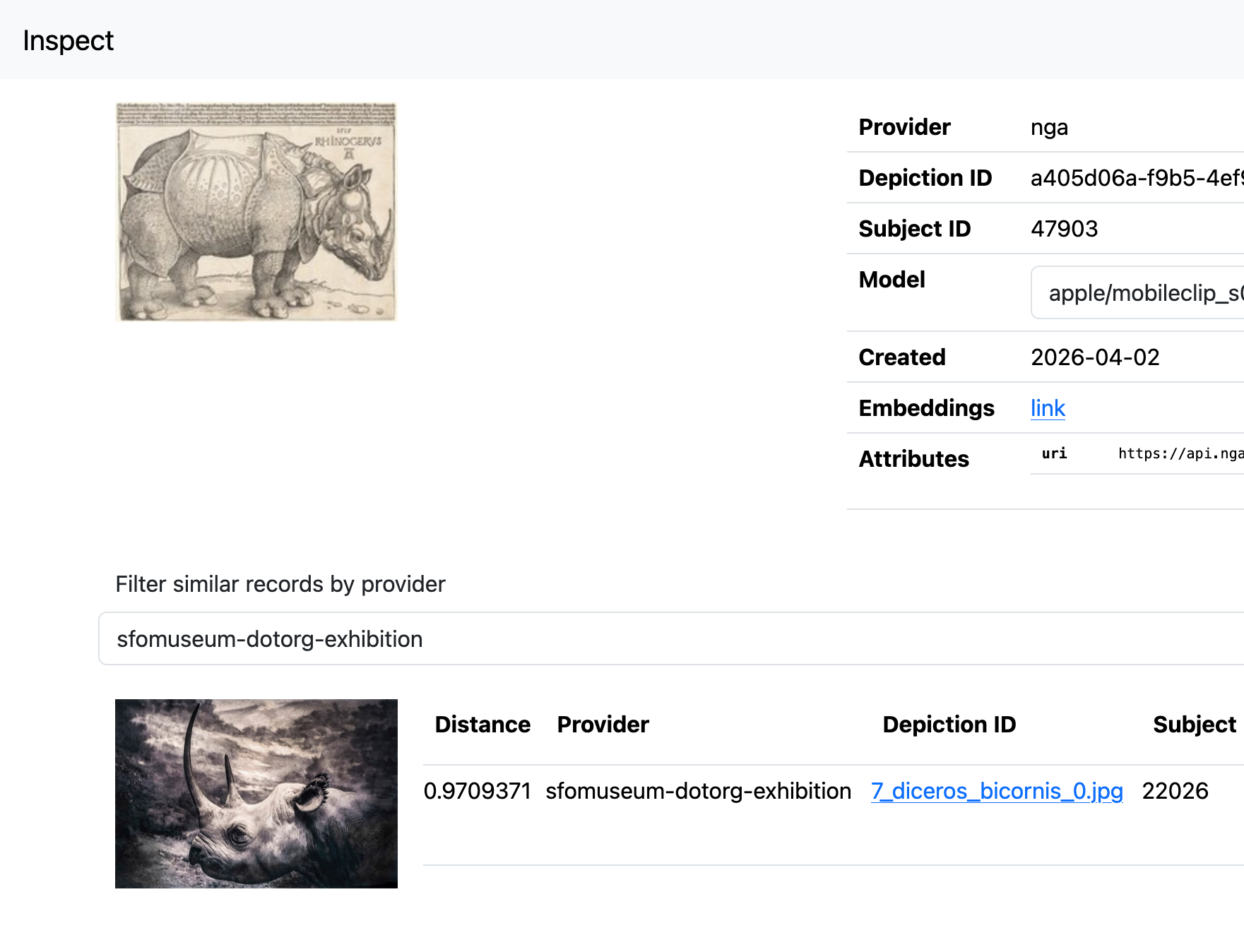
For example, here is the most similar image from the collection of SFO Museum exhibition galleries photographs for Dürer’s “The Rhinoceros” at the National Gallery of Art:
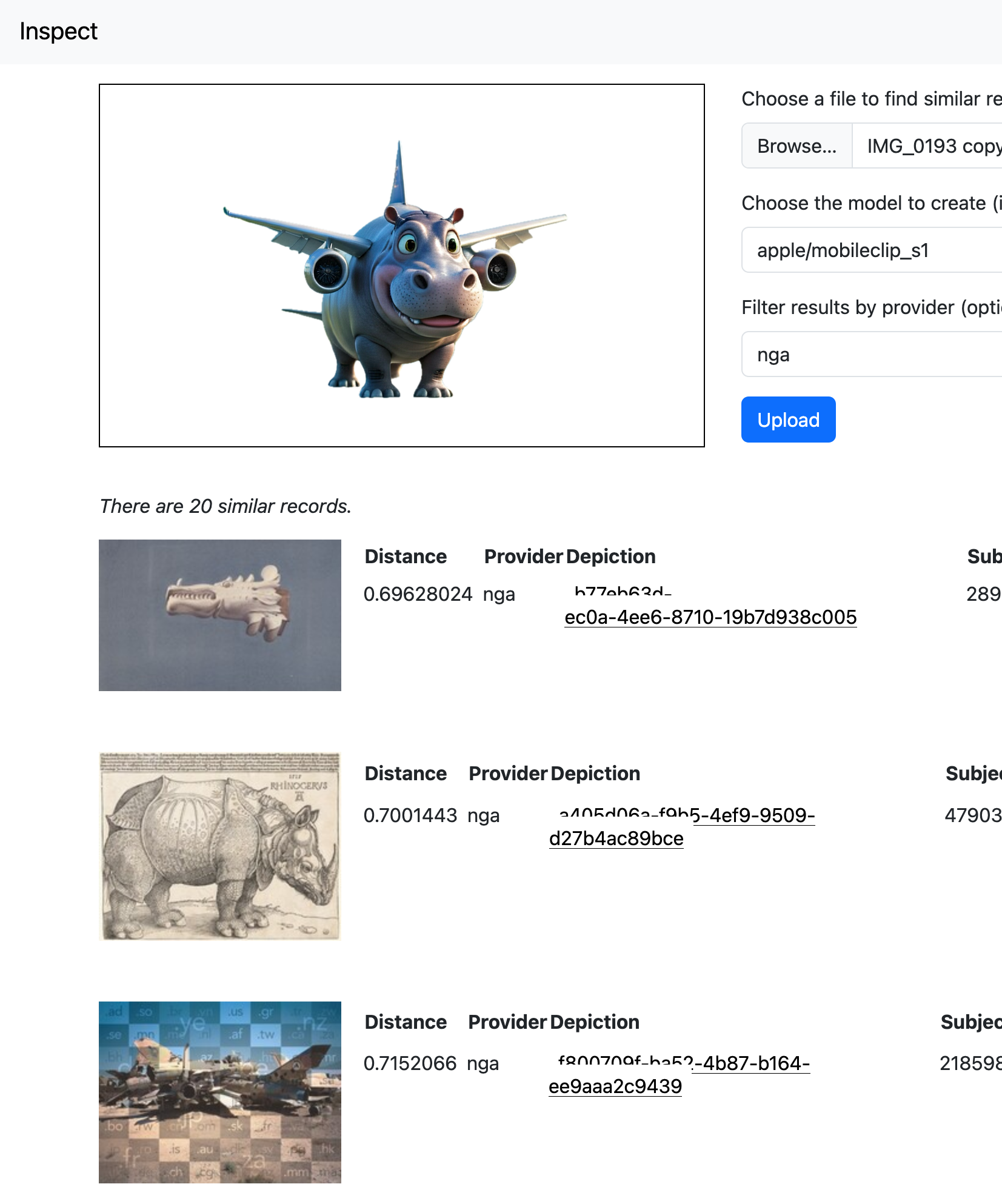
And here are the objects from the National Gallery of Art which are the most “similar” to a silly picture, as imagined by a generative AI system, of a “pygmy hippopotamus holding an airplane”:
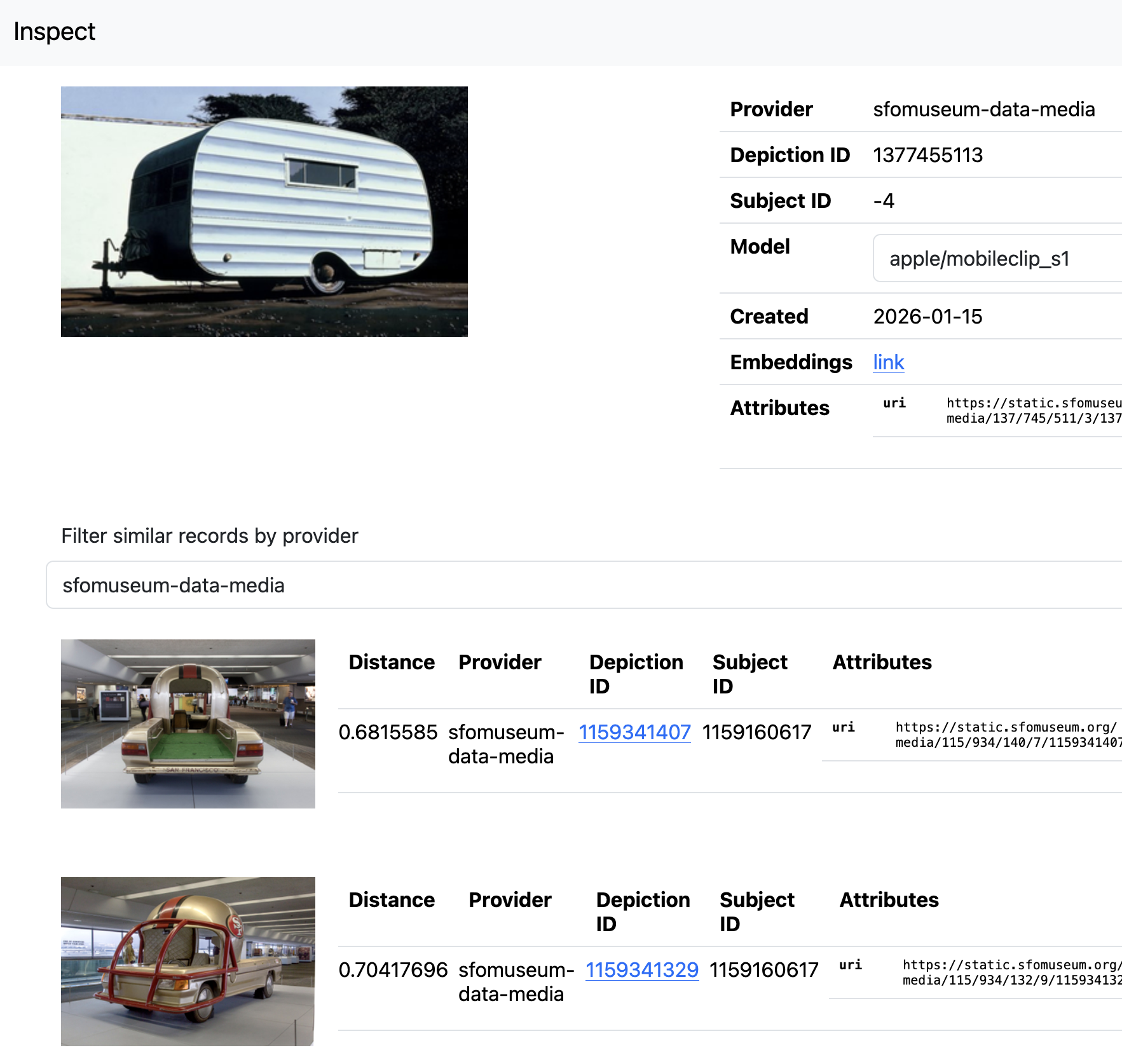
Or SFO Museum exhibition-installation photos that are similar to James Toklakson’s painting Behind Ted McMann’s Garage. In this case, photos of the San Francisco 49ers helmet car on display in the 2015 exhibition “The Nation’s Game: The NFL from the Pro Football Hall of Fame”. Careful readers will note that most of these examples have very high “similarity” (or distance) scores meaning that while similar they are not necessarily alike. That is not unexpected when comparing imagery from different sources but it is possible to see the outlines of what the machine-learning models used to derive these matches “think” is similar. The underlying data used by these models (huge multi-dimensional lists of numbers) is hard to make sense of on its own and so there is real value in being able to visualize, to give an shape to, the choices being made under the hood.
That’s really all the application does. It is a simple tool to enable the visual inspection and evaluation of machine generated vector embeddings for images from a variety of sources. Details for setting up and running an instance of the embeddingsdb-inspector are available in the sfomuseum/go-embeddingsdb package, on GitHub, but the rest of this blog post is about the larger question of how we (cultural heritage institutions) can agree on a simple-is-best approach to sharing vector embeddings of our collections.
What is the simplest thing?
In the last blog post (Updates (and additions) to machine-learning tools running on consumer hardware) I introduced the embeddingsdb application:
embeddingsdb calls itself an “opinionated package for storing, indexing and querying vector embeddings” which means that many of the concepts are informed by the needs and goals of SFO Museum. Specifically, vector embeddings are assigned and grouped by the following properties:
- provider – The source, or context, of the data for which embeddings are generated. For the sfomuseum-data-media-collection data repository.
- depiction_id – The primary identifier of the data for which embeddings are generated. For example image ID 1779489551.
- subject_id – The primary identifier for the subject that the depiction ID depicts (and for which embeddings are generated). For example, object ID 1511924829.
- model – A unique identifier of the machine-learning model used to generate embeddings for the depiction. For example, apple/mobileclip_s0.
These properties, in addition to the vector embeddings themselves, make up the core of what constitutes a stored “record” in the database and allow us to store multiple embeddings (generated using different models) for the same depiction, to store data from multiple sources (providers) and to query them jointly or separately and to scope queries with both subject (object) and depiction (image) levels of granularity. Despite being SFO Museum-focused we think that embeddingsdb is broadly applicable to many other cultural heritage collections. As of this writing the `embeddingsdb` database does not support embeddings with different dimensionalities but I expect that, out of necessity, it will in the near future.
This is a blog post about how we might establish what the “simplest and dumbest” amount of additional metadata is necessary for two or more cultural heritage institutions to share vector embedding data from their respective collections or holdings, in order to perform cross-institutional similarity queries. The underlying data structure for records stored in embeddingsdb looks like this:
// Record defines a struct containing properties associated with individual records stored in an embeddings database.
type Record struct {
	// Provider is the name (or context) of the provider responsible for DepictionId.
	Provider string
	// DepictionId is the unique identifier for the depiction for which embeddings have been generated.
	DepictionId string
	// SubjectId is the unique identifier associated with the record that DepictionId depicts.
	SubjectId string
	// Model is the label for the model used to generate embeddings for DepictionId.
	Model string
	// Embeddings are the embeddings generated for DepictionId using Model.
	Embeddings []float32
	// Created is the Unix timestamp when Embeddings were generated.
	Created int64
	// Attributes is an arbitrary map of key-value properties associated with the embeddings.
	Attributes map[string]string
}
Because producing vector embeddings can be both resource-intensive and time-consuming it often makes sense to write embeddings data to static files for later ingestion and processing. We do that using the data model described above. In the past these static files were written as comma-separated or JSON-encoded data records. Recently we have been experimenting with the Apache Parquet format. In addition to being designed for efficient storage and retrieval, Parquet files are “cloud-native” which means data in those files can be read and queried remotely (using a tool like DuckDB) without having to download all the data locally.

This is useful, for SFO Museum, because we have a variety of different data sources that we want to generate vector embeddings for: Objects from the aviation collection, exhibition object photos, exhibition installation photos and Instagram posts just to name a few. Being able to generate vector embeddings for all of these images allows us to query for similar imagery across otherwise disparate catalogs. Being able to store those embeddings in a compact, portable and “cloud-native” format is an operational efficiency with an added benefit: It makes it easy to share those embeddings.
Which is really what this blog post is about: It is a proposal for museums and other cultural heritage institutions to generate vector embeddings for the materials in their collections and to publish them on their own websites (or other channels) for other institutions to download and to mix-and-match both with their own datasets, and with other third-party datasets, as they see fit.
Cross-institutional collections search continues to be something of a “holy grail” in museums and other cultural heritage institutions. Vector-based image similarity, while imperfect, offers a meaningful first step to finally achieving it. It is a messy, or at least fuzzy, solution and tilts more towards the “discovery and surprise” end of the spectrum rather than informed and academic research. It is important to be realistic about what it affords and what it doesn’t. While it may not be a tool for scholars and experts it can still provide meaningful avenues for non-experts to investigate and discover the relationship between different collections. This was still the stuff of fantasy a few years ago and now it is within our reach using nothing more than consumer-grade computer hardware.
As mentioned at the top of this post sharing our vector embeddings also provide more data, from a variety of different sources (collections), by which we might be able to evaluate the strengths, weaknesses, biases and shortcomings of the different machine learning models used to produce those embeddings. In as much as no one seems to really understand what’s happening inside the guts of any given machine-learning model, and in as much as the cultural heritage sector is still a consumer rather than a producer of these models, having as broad a set of inputs and outputs (collection imagery and their vector embeddings) to use for comparative purposes seems like it would be a good and useful thing for the broader sector.
At this point I should mention that SFO Museum has not published any of its own vector embeddings yet. I would like to see what, if any, reaction there is to this blog post and whether it results in any meaningful changes to the underlying data model (discussed further below). If there is no immediate reaction then we’ll just go ahead with what we’ve got and release the data as-is with a proviso that they may still change in future releases.
For the purposes of this discussion I am going to assume the data model SFO Museum has developed for use with embeddingsdb. It should only be considered a starting point, though; something which can be used with working code (also described below) to help identify edges and boundaries.
Currently, our data model targets vector embeddings for images of collection objects. More generically, “depictions” of “subjects”. These are assumed to be the internal unique identifiers assigned by the institution, or “provider”, responsible for those objects, and their images. There are no rules, or even conventions, for how to identify “providers”. A fully-qualified URL would be an obvious choice but it introduces a lot repeated boilerplate into the Parquet files. Maybe that doesn’t matter?
Likewise, there are no conventions for what should be included in the Attributes property which is currently defined as a freeform key-value lookup. So far the only convention has been to include a link to the image, or a thumbnail of that image, used to generate embeddings so that it is possible to usefully inspect the results of a similar query against a set of embeddings. Should there be others required properties, though? For example:
- Title? What about other properties that might be necessary or desirable for text-based?
- A link back to an online representation of the subject (or the depiction)?
- Perhaps a link to a IIIF manifest or some other machine-readable metadata?
- Is it okay for multiple depictions to point back to a machine-readable document (like a IIIF manifest) referencing the subject? Current practice rarely assumes machine-readable representations of depiction (image) assets.
- The IIIF image.json record, associated with an image, might be a good candidate but it is really designed for image manipulations and doesn’t explicitly reference the object (subject) it depicts without custom extensions.
- Could Flickr-style “machine tags”, with an agreed-upon set of known prefixes mapped to organizations, be enough?
The goal here is to establish the least amount of metadata necessary to accurately reflect provenance while providing avenues for machine-readable metadata to be derived on a case-by-case basis. We would love input from others in the sector on these questions. What follows are some tools we’ve been developing to help try answering them.
go-embeddings-harvest

To help “kick the tires” on some of these ideas we have published the sfomuseum/go-embeddings-harvest package which provides a number of different command-line applications to produce Parquet files containing vector embeddings (encoded using the data model described above) for a number of different sources. As of this writing these include:
- SFO Museum Aviation Collection object images and exhibition installation photos.
- SFO Museum Instagram posts.
- Images from the National Gallery of Art collection.
- Images derived from the Flickr API.
For example, to derive embeddings from the San Diego Air and Space Museum’s California’s Aviation Heritage photoset:
$> cd /usr/local/src/go-embeddings-harvest

$> ./bin/harvest-flickr-embeddings \
	-flickr-client-uri file:///usr/local/flickr.txt \
	-param user_id=49487266@N07 \
	-param method=flickr.photosets.getPhotos \
	-param photoset_id=72157710813888403 \
	-provider flickr-49487266@N07 \
	-spr-path photoset.photo \
	-model s0,s1,s2 \
	-output flickr.parquet \
And then to import those embeddings, encoded in the flickr.parquet file:
$> cd /usr/local/src/go-embeddingsdb

$> ./bin/parquet-import \
	-client-uri grpc://localhost:8081 \
	/usr/local/src/go-embeddings-harvest/flickr.parquet
There are many ways to generate Parquet files. The purpose of the go-embeddings-harvest package is only to demonstrate how vector embeddings from a variety of sources might be generated and to have a reference implementation for how data from those sources should be encoded. The proposal to develop a common data model for sharing vector embeddings is not about promoting one set of tools (go-embeddings-harvest, go-embeddingsdb or otherwise) over another. The proposal is to develop something simple enough that it may be integrated with any number of existing workflows with the least amount of fuss.
The rest of this post is about some technical updates to the sfomuseum/go-embeddingsdb package. If that doesn’t interest you or you are using another vector database to index and query vector embeddings, you can stop reading now.
Updates to the go-embeddingsdb package
In the example above vector embeddings are imported into an embeddingsdb instance using a tool called parquet-import. This, along with a corresponding parquet-export tool, is a new addition to the sfomuseum/go-embeddingsdb package. There are two other notable additions:
sqlite-vec
There is now a SQLite-based implementation of the go-embeddingsdb/database.Database interface, for managing embeddings, using the sqlite-vec extension. While the DuckDB implementation is generally faster than the SQLite implementation, the former also requires that all your data be stored in memory. That data is periodically exported to disk in order that it may be re-imported without indexing all the data from scratch but it takes a noticeable amount of time to import that data at startup time. The SQLite implementation, while slower, stores (and reads) all its data from disk.
go-embeddings
The go-embeddingsdb package has also been updated to use the sfomuseum/go-embeddings package to derive embeddings. As a reminder: embeddingsdb only handles storing, indexing and querying vector embeddings. It does not handle the job of producing embeddings. It is unfortunate that both packages have names that sound so much alike. That may change in time.
The go-embeddings package defines a high-level Embedder interface which is then implemented by a number of different “providers” (described below). The interface itself looks like this:
// Embedder defines an interface for generating (vector) embeddings
type Embedder[T Float] interface {
	TextEmbeddings(context.Context, *EmbeddingsRequest) (EmbeddingsResponse[T], error)
	ImageEmbeddings(context.Context, *EmbeddingsRequest) (EmbeddingsResponse[T], error)
}
By default the package exports implementations for the following providers:
encoderfile://
Derive vector embeddings from an instance of the Mozilla encoderfile application, running as an HTTP server.
mlxclip://
Derive vector embeddings from a Python script using the harperreed/mlx_clip library which emits JSON-encoded embeddings to STDOUT.
mobileclip://
Derive vector embeddings from the MobileCLIP models exposed via an instance of the sfomuseum/swift-mobileclip gRPC endpoint. I wrote about this provider in depth in the “Similar object images derived using the MobileCLIP computer-vision models” blog post.
ollama://
Derive vector embeddings from an instance of the Ollama application.
openclip://
Derive vector embeddings from a web service exposing the OpenCLIP model and library.
Note that not all of these providers support generating image embeddings. When in doubt the easiest thing to get started with is the sfomuseum/swift-mobileclip package.