
Registrar – Experiments with Apple's on-device machine-learning frameworks

Next week, I am participating in a panel titled Museums, AI, and Open Systems: Trust, Autonomy and Sustainability at the annual Museum Computer Network (MCN) conference in Minneapolis. The panel “examines the need for museums to consider open-source artificial intelligence and machine-learning solutions as a means of preserving transparency, control, and ethical integrity within the sector”. In advance of that discussion SFO Museum is releasing some experimental work in a spirit of generosity and in the hopes of spurring conversation and collaboration.
It is a minimalist iOS application called Registrar for capturing exhibition object photos, scanning wall labels and parsing them in to structured data using on-device machine-learning tools and embedding that (structured) data in to the UserComment EXIF tag of each photo. The idea is to use the DataScanner and FoundationModel frameworks, both available by default on contemporary iPhones and iPad devices, to quickly scan and then convert camera-imagery of wall label text in to structured data using the following prompt:
Parse this text as though it were a wall label in a museum describing an object in to a JSON dictionary of descriptive key-value pairs. Wall labels are typically structured as follows: name, date, creator, location, media, credit line and accession number. Usually each property is on a separate line but sometimes, in the case of name and date, they will be combined on the same line. Some properties, like creator, location and media are not always present. Sometimes titles may have leading numbers, followed by a space, acting as a key between the wall label and the surface the object is mounted on. Remove these numbers if present. This is text in question:
Putting it all together the application looks like this:
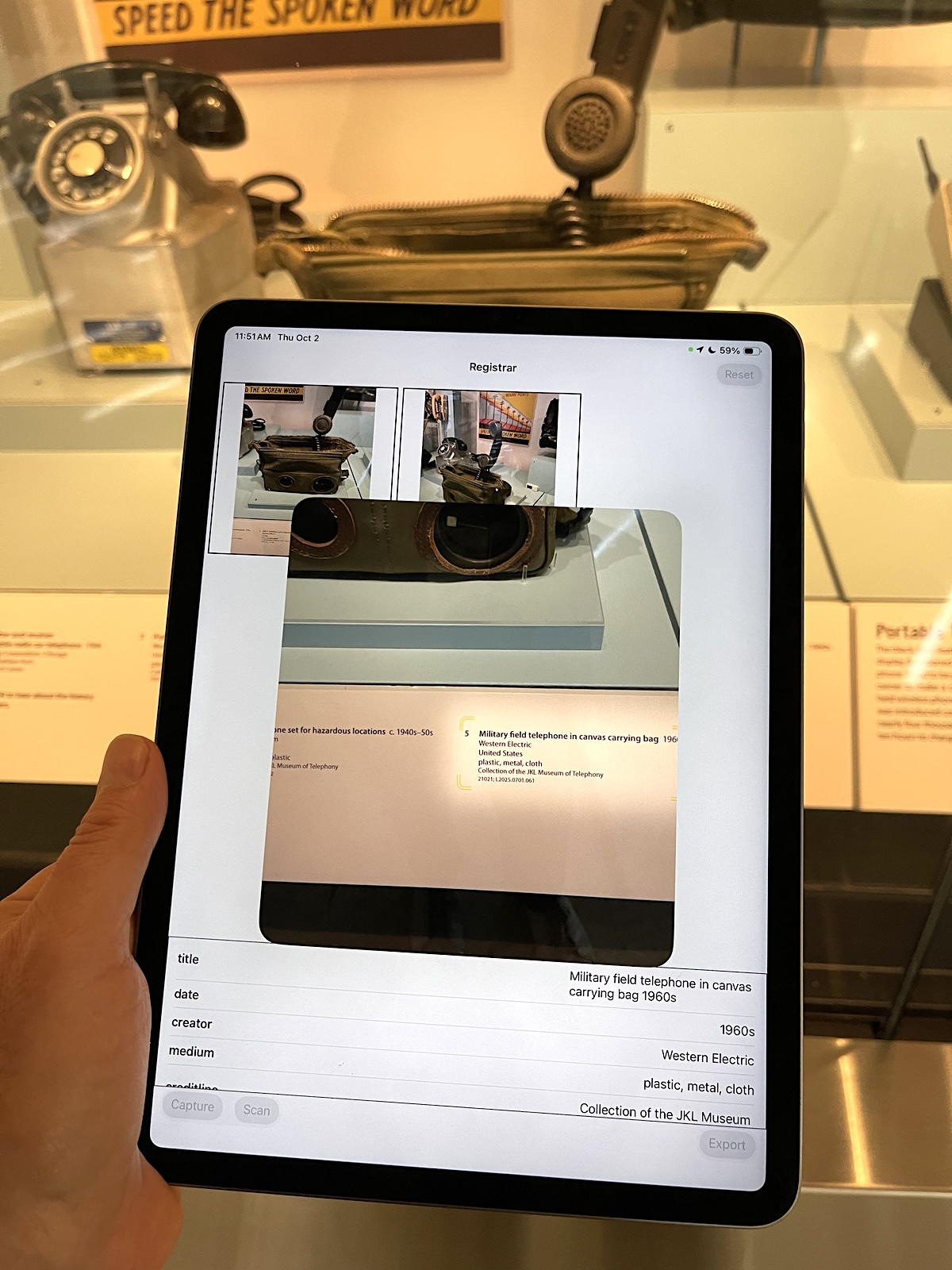
The user-interface, such as it is, is minimal and often clunky. At this stage the goal is still just to get the plumbing to work before thinking about ease of use and other polish. In this screenshot the wall label captured by the DataScanner framework is being converted in to structured data (usng the FoundationModel framework) and then displayed in a table.
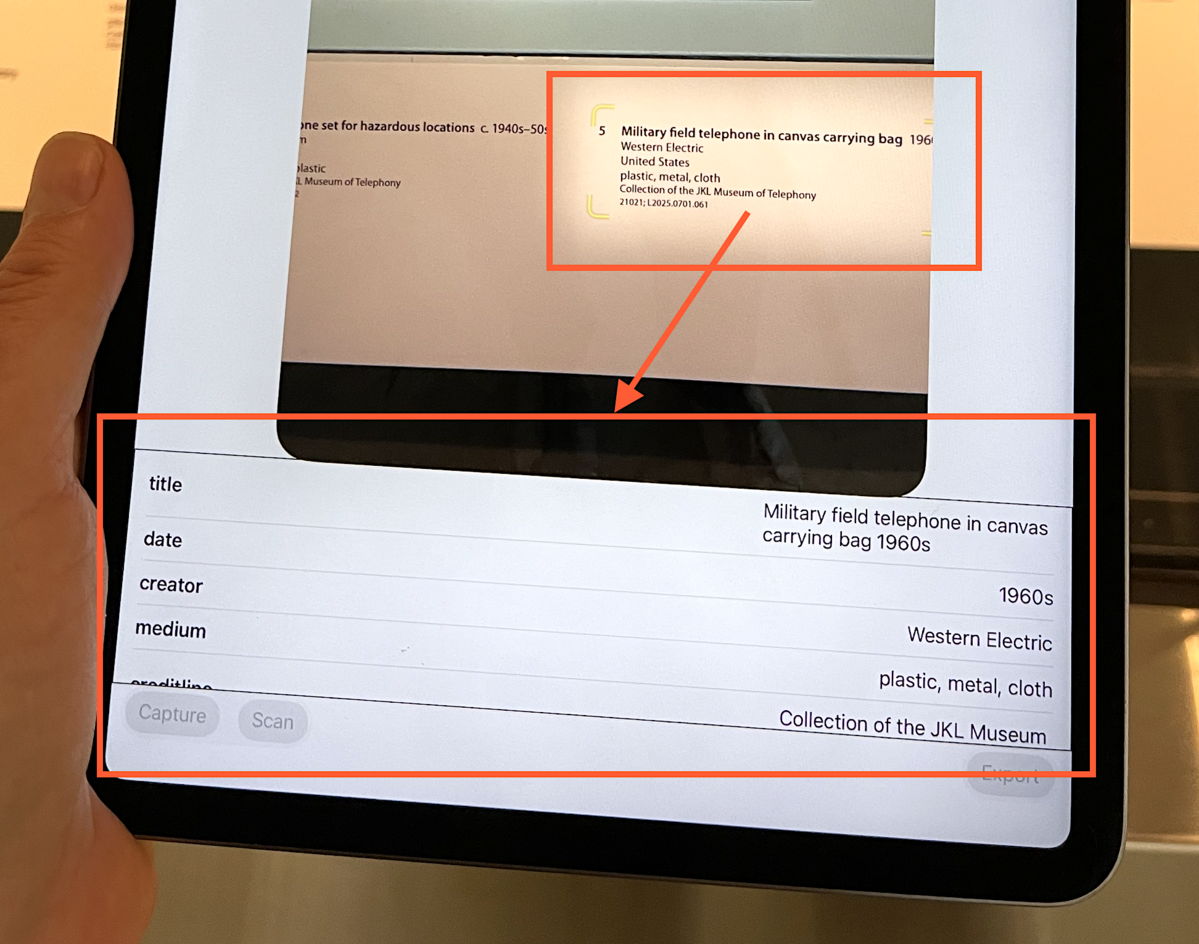
The larger goal is to speed up data collection used to generate vector embeddings or other machine-learning-related products that might allow photos of museum objects taken by passengers, often quickly and in-motion and always surrounded by all the background noise of a busy airport, to be paired with the canonical records for those objects. The details of which are a whole other can of worms but as is the case with all machine learning projects data collection is always the first hurdle. Registrar aims to make the work of collecting that data a little easier and faster.
The data collection piece mostly works. What that means is that photo capture, data scanning, list views, EXIF updates and saving photos to the device all work. Except when they don’t. The FoundationModel piece to convert the scanned data (text) in to structured data only sometimes works. When it doesn’t work there are no errors triggered or reported but the on-device models are unable to derive any structured data. While the DataScanner framework is generally stable I have observed that from time to time is will just stop returning text that it has scanned to the application. It doesn’t trigger any errors but doesn’t return any data either. Restarting the application will generally “fix” the problem. Processing scanned data on an recent (2023-ish) iPad mini takes a noticeable amount of time, usually measured in seconds so it’s necessarily “fast” but if you assume that data for a single wall label only needs to be collected once in order to be applied to multiple images it sort of averages out.
When it works
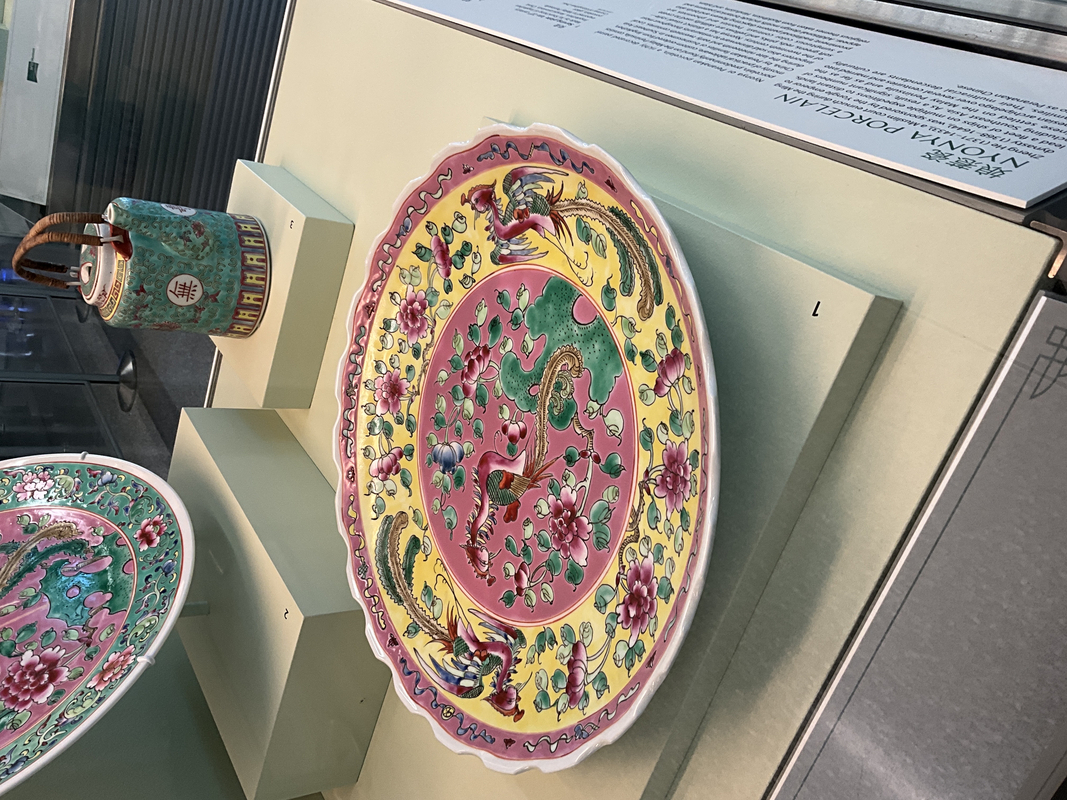
Here’s an example of what the flow looks like when everything works scanning a serving plate from the Everyday Elegance in Chinese Ceramics exhibition on display in the International Terminal.
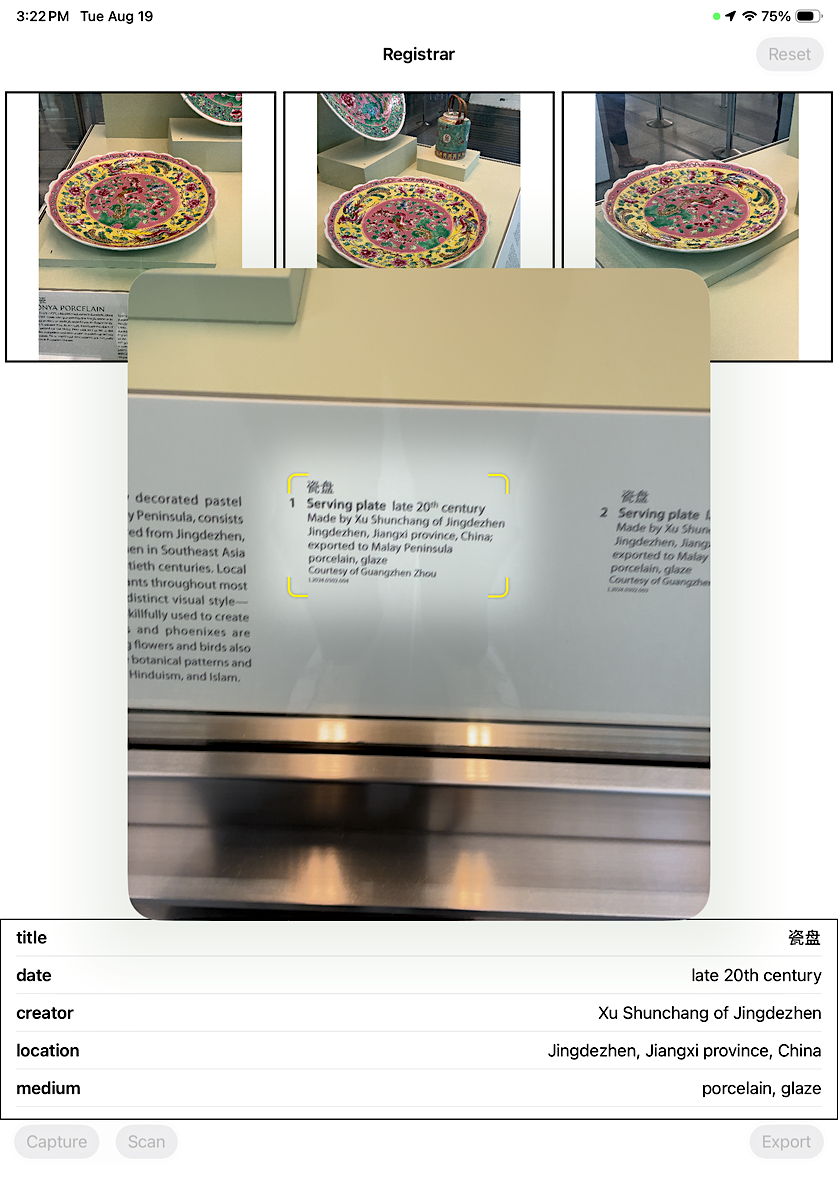
Multiple images are captured, the wall label is scanned and that data is encoded as a JSON string in the UserComment EXIF field in each photo. For example:
$> exiv2 -pa IMG_0062.JPG
Exif.Image.Orientation                       Short       1  right, top
Exif.Image.XResolution                       Rational    1  72
Exif.Image.YResolution                       Rational    1  72
Exif.Image.ResolutionUnit                    Short       1  inch
Exif.Image.YCbCrPositioning                  Short       1  Centered
Exif.Image.ExifTag                           Long        1  102
Exif.Photo.ExifVersion                       Undefined   4  2.21
Exif.Photo.ComponentsConfiguration           Undefined   4  YCbCr
Exif.Photo.UserComment                       Undefined 493  charset=Ascii {"timestamp":1755642158,"title":"??","medium":"porcelain, glaze","accession_number":"L2024.0302.004","location":"Jingdezhen, Jiangxi province, China","creator":"Xu Shunchang of Jingdezhen","input":"??\nServing plate late 20th century\nMade by Xu Shunchang of Jingdezhen Jingdezhen, Jiangxi province, China; exported to Malay Peninsula porcelain, glaze\nCourtesy of Guangzhen Zhou\nL2024.0302.004","longitude":-122.38946285054107,"date":"late 20th century","latitude":37.61481973151702}
Exif.Photo.FlashpixVersion                   Undefined   4  1.00
Exif.Photo.ColorSpace                        Short       1  Uncalibrated
Exif.Photo.PixelXDimension                   Long        1  4032
Exif.Photo.PixelYDimension                   Long        1  3024
Exif.Photo.SceneCaptureType                  Short       1  Standard
Exif.Thumbnail.Compression                   Short       1  JPEG (old-style)
Exif.Thumbnail.XResolution                   Rational    1  72
Exif.Thumbnail.YResolution                   Rational    1  72
Exif.Thumbnail.ResolutionUnit                Short       1  inch
Exif.Thumbnail.JPEGInterchangeFormat         Long        1  792
Exif.Thumbnail.JPEGInterchangeFormatLength   Long        1  12648
A JSON-encoded string stored in an EXIF header is sometimes hard to make sense of so we’ve written some simple command line tools for extracting that data and making it a little easier to understand:
$> ./bin/walllabel IMG_0062.JPG | jq
{
  "title": "??",
  "date": "late 20th century",
  "creator": "Xu Shunchang of Jingdezhen",
  "creditline": "",
  "location": "Jingdezhen, Jiangxi province, China",
  "medium": "porcelain, glaze",
  "accession_number": "L2024.0302.004",
  "timestamp": 1755642158,
  "latitude": 37.61481973151702,
  "longitude": -122.38946285054107,
  "input": "??\nServing plate late 20th century\nMade by Xu Shunchang of Jingdezhen Jingdezhen, Jiangxi province, China; exported to Malay Peninsula porcelain, glaze\nCourtesy of Guangzhen Zhou\nL2024.0302.004"
}
I said that this was an example of everything “working” which is not entirely true. Specifically, the on-device machine-learning system was unable to derive the object’s credit line (“Courtesy of Guangzhen Zhou”) and the object’s title (“瓷盘”) was not encoded correctly. That’s not so much a machine-learning issue as it is an EXIF issue since the (EXIF) standard requires ASCII-encoded text which, unhandled, will yield problems like the one above. This highlights the need for improvements to ensure that non-ASCII text is stored using appropriate Unicode escape sequences to prevent data loss. Finally, note the input field which (notwithstanding the encoding issues mentioned above) contains the raw text of the wall label. That enables further processing off-device. Additionally, the timestamp and the latitude, longitude coordinates of the camera capturing an image are recorded since those might also come in handy at a later stage.
When it doesn’t work
Here’s an example of what the flow looks like when things don’t work using an image of the object titled “Canoe Travelers” from the Preston Singletary: Raven Visits SFO exhibition also on display in the International Terminal.
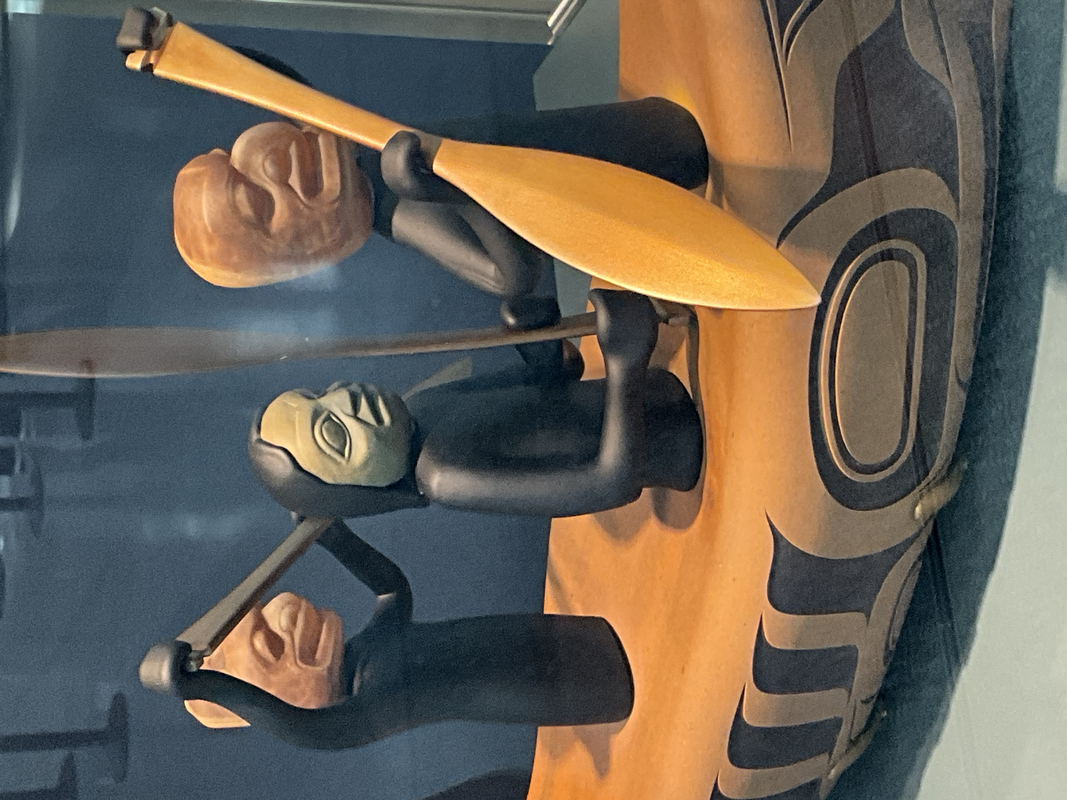
The text of the wall label is successfully scanned but is not parsed in to structured data. Why? I have no idea and the on-device FoundationModel framework yields no errors. It simply doesn’t return any data. That’s a bit frustrating.
$> exiv2 -pa IMG_0151.JPG
Exif.Image.Orientation                       Short       1  right, top
Exif.Image.XResolution                       Rational    1  72
Exif.Image.YResolution                       Rational    1  72
Exif.Image.ResolutionUnit                    Short       1  inch
Exif.Image.YCbCrPositioning                  Short       1  Centered
Exif.Image.ExifTag                           Long        1  102
Exif.Photo.ExifVersion                       Undefined   4  2.21
Exif.Photo.ComponentsConfiguration           Undefined   4  YCbCr
Exif.Photo.UserComment                       Undefined 271  charset=Ascii {"timestamp":1755643501,"latitude":37.616128802722045,"longitude":-122.3899980594365,"input":"Canoe Travelers 2025\nPreston Singletary (b. 1963)\nblown and sand-carved glass, hot-sculpted glass, cast glass, patinaed steel\nCourtesy of the artist\nL2025.0601.007"}
Exif.Photo.FlashpixVersion                   Undefined   4  1.00
Exif.Photo.ColorSpace                        Short       1  Uncalibrated
Exif.Photo.PixelXDimension                   Long        1  4032
Exif.Photo.PixelYDimension                   Long        1  3024
Exif.Photo.SceneCaptureType                  Short       1  Standard
Exif.Thumbnail.Compression                   Short       1  JPEG (old-style)
Exif.Thumbnail.XResolution                   Rational    1  72
Exif.Thumbnail.YResolution                   Rational    1  72
Exif.Thumbnail.ResolutionUnit                Short       1  inch
Exif.Thumbnail.JPEGInterchangeFormat         Long        1  570
Exif.Thumbnail.JPEGInterchangeFormatLength   Long        1  11210
This is one reason why the raw text of the wall label is encoded in an image’s EXIF header: There is still data to work with, out-of-band and off-device, in a failure scenario.
$> ./bin/walllabel IMG_0151.JPG | jq
{
  "title": "",
  "date": "",
  "creator": "",
  "creditline": "",
  "location": "",
  "medium": "",
  "accession_number": "",
  "timestamp": 1755643501,
  "latitude": 37.616128802722045,
  "longitude": -122.3899980594365,
  "input": "Canoe Travelers 2025\nPreston Singletary (b. 1963)\nblown and sand-carved glass, hot-sculpted glass, cast glass, patinaed steel\nCourtesy of the artist\nL2025.0601.007"
}
Next steps: llama.cpp

The llama.cpp project is an open source project to “enable LLM inference with minimal setup and state-of-the-art performance on a wide range of hardware”, including Apple devices. The Registrar project has a separate llama-cpp branch with code to use the llama.cpp XCFramework Swift bindings alongside an llama.cpp-compatible model copied to the application’s Documents folder. This work compiles and the application accepts canned prompts but, as of this writing, returns gibberish. I suspect this is because I am “doing it wrong” but I have yet to untangle how the llama.cpp code needs to be structured. The goal is, using an iOS-sized model like Qwen_Qwen3-1.7B-GGUF_Qwen3-1.7B-Q8_0.gguf, to derive the same output produced by running this query through the llama-server tool:
Parse this text as though it were a wall label in a museum describing an object in to
a JSON dictionary of descriptive key-value pairs. Wall labels are typically structured
as follows: name, date, creator, location, media, credit line and accession number.
Usually each property is on a separate line but sometimes, in the case of name and date,
they will be combined on the same line. Some properties, like creator, location and media
are not always present. Sometimes titles may have leading numbers, followed by a space,
acting as a key between the wall label and the surface the object is mounted on. Remove
these numbers if present. This is text in question:

Virgin America flight attendant uniform 2007
cotton, polyester, plastic, wool, metal
Collection of SFO Museum Gift of Sirena Lam
Belt: gift of Lisa Larsen
2018.071.017, 2019.032.012, 013, 015, 019
L2023.1401.072-.076
Which yields:
{
"name": "Virgin America flight attendant uniform",
"date": "2007",
"creator": "",
"location": "Collection of SFO Museum Gift of Sirena Lam",
"media": "cotton, polyester, plastic, wool, metal",
"creditline": "Collection of SFO Museum Gift of Sirena Lam",
"accession numbers": ["2018.071.017", "2019.032.012", "013", "015", "019", "L2023.1401.072-.076"]
}
Note the incorrect location property. It is safest to assume that every model will find a way to be wrong about something, usually accession numbers. There’s a whole other post about incorporating this work with the Accession Numbers Project but we’ll save that for another day.
It stands to reason that in some future release the Apple FoundationModel framework will support the use of custom models for performing tasks but until then we’ll keep chipping away the code to switch between using the on-device models and bespoke models installed locally and manipulated using the llama.cpp bindings. While the built-in functionality that Apple has made available by default is certainly convenient it seems expedient to have another way, where we can exert a modicum of control, to do the same things.
Next steps: Bug fixes, design improvements
As mentioned the llama.cpp piece doesn’t really work yet so any suggestions, contributions or fixes are welcome. The same is true for any of the bugs we already know exist (described above) as well as those we haven’t found yet, and is especially true for user-interface and improvements. As I said, at the beginning, this is an experimental project to investigate its usefulness but that means it only gets limited attention in between all the other things. The source code for the Registrar project can be found here:
We are releasing this work in a spirit of generosity and to encourage others to suggest improvements with the larger goal of providing resources (even if that resource is simply a “reference implementation” demonstrating how something works) to help the broader cultural heritage sector think about how to use machine learning technologies outside and beyond the promises of the billboards advertising these same technologies in Silicon Valley and the world over.